360 Cloud Net
  • Hosting
    • Hosting plansBronze, Silver and Gold from $25/month
    • About our hostingcPanel, Sydney servers, backups
    • SSL certificatesExtra certificates for more sites
  • Domains
    • Register a domainFind your new web address
    • Transfer a domainMove your domain to us
  • Extras
    • Website careUpdates and backups done for you
    • SEOGet found on Google
  • Help
    • KnowledgebaseGuides and how-tos
    • Open a ticketGet help from our team
    • Server statusIs everything running?
    • NewsAnnouncements
    • Contact usCall 0418 501 122
  • Company
    • About usWho we are
    • Why choose usLocal, honest hosting
0 Log in Order
  1. Portal Home
  2. Knowledgebase
  3. Email (Mail)
  4. How to set up a security certificate in outlook - when prompted

  Categories

Advanced
5
Client Area
10
cPanel
8
Databases
14
DNS (Name Servers)
17
Domains
21
Email (Mail)
13
Email Programs
13
Files
6
FTP Programs
18
Hosting Record How-to
2
Installing Software
2
Introduction to Web Hosting
8
Joomla
18
Logs
1
phpMyAdmin
13
Policies
2
Security
4
Softaculous
15
SSL Certificates
1
Switching Hosts
1
Transferring Your Domain
17
TroubleShooting
6
Using my Browser
3
Web Hosting
1
Website Backup
1
Where do I go ?
1
WordPress
12

  Categories

  Tag Cloud

overage billing

  Support

My Support Tickets
Announcements
Knowledgebase
Downloads
Network Status
Open Ticket

How to set up a security certificate in outlook - when prompted Print

  • 1

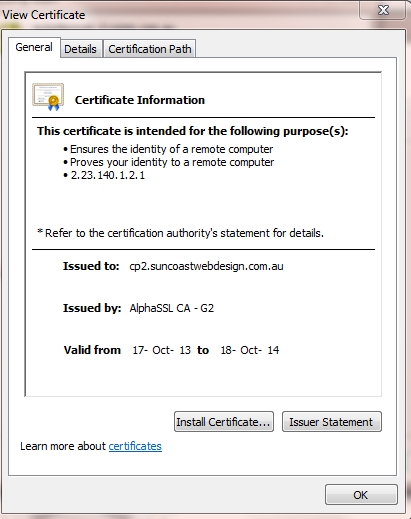
When you are prompted to set up a security certificate,
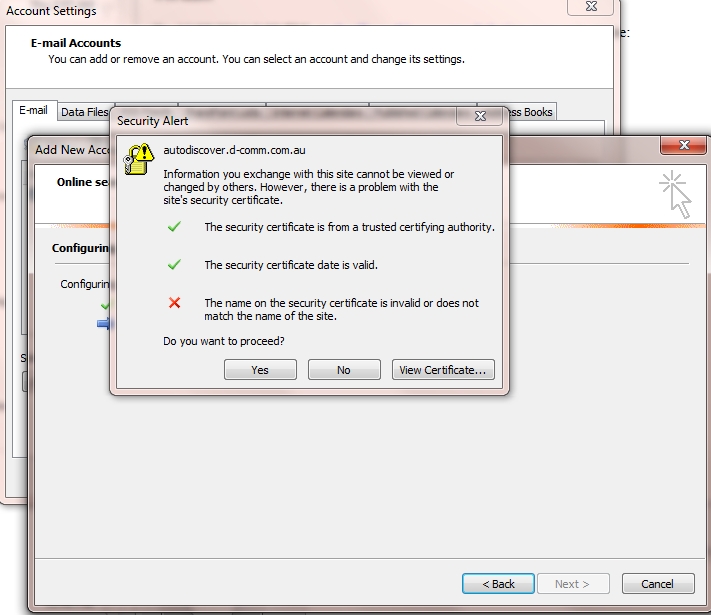
email security certification one


Click yes

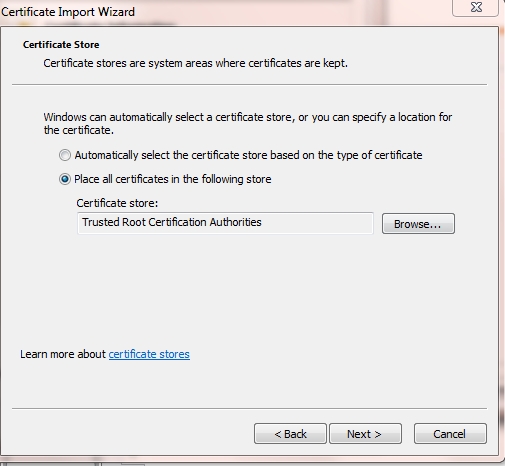
security certificate installation for outlook


Click install certificate

security certificate installation for outlook last image

More info here

http://blogs.technet.com/b/asiasupp/archive/2007/05/29/self-signed-certificate-issue-when-connecting-to-the-exchange-server.aspx


Was this answer helpful?

Related Articles

How to Create a Default Email Account Now let's set our Default (or catchall) email address. The default email address will "catch" any... How to Create A POP Email Account This tutorial will teach you how to create POP email accounts. These accounts will be based off... How to Create an Auto Responder This tutorial will teach you how to create an auto responder. You can use auto responders to... How to set up a POP email account on your iPhone The purpose of this tutorial is to teach you how to set up a POP email account on your iPhone.... How to setup an IMAP email account on your iPhone This tutorial will teach you how to setup an IMAP email account on your iPhone. The first thing...
« Back

  Tag Cloud

overage billing

  Support

My Support Tickets
Announcements
Knowledgebase
Downloads
Network Status
Open Ticket
360 Cloud Net

Australian web hosting, run from the Sunshine Coast on servers in Sydney.

Sunshine Coast QLD 4551
ABN 16 368 612 807

Hosting

Hosting plans About our hosting Domains

Help

Knowledgebase Open a ticket Server status Client Area

Contact

0418 501 122 [email protected] Contact form
© 2026 360 Cloud Net. All prices in AUD. Terms of Service · Privacy Policy · Acceptable Use

Loading...
Loading...
Choose language
العربية
Azerbaijani
Català
中文
Hrvatski
Čeština
Dansk
Nederlands
English
Estonian
Persian
Français
Deutsch
עברית
Magyar
Italiano
Macedonian
Norwegian
Português
Português
Română
Русский
Español
Svenska
Türkçe
Українська

Generate Password

Enter a number between 12 and 64 for the password length.